Frustrating, isn’t it? You come home, ready to catch up on your favorite show, and your Itel phone not charging. It’s a common problem, leaving you stranded without communication or access to your digital life. This guide will help you diagnose and fix your Itel phone charging issues, saving you time, money, and frustration. You’ll learn troubleshooting steps, common causes, and preventative measures to keep your phone powered up.
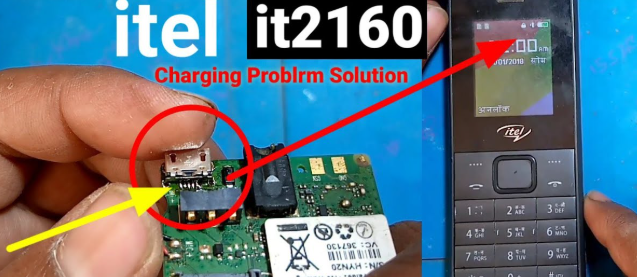
Troubleshooting Your Itel Phone Charging Issues
This section focuses on the practical steps you can take to resolve your Itel phone’s charging problem. We’ll cover simple checks and more advanced solutions.
Check the Charging Cable and Adapter
- Inspect the charging cable for any visible damage: Look for fraying, bends, or kinks along the length of the cable, particularly near the connectors. Damaged cables often cause intermittent or no charging, as the internal wires may be broken or disconnected.
- Test the charging adapter: Try using a different, known-good adapter with your Itel phone. A faulty adapter can prevent proper power delivery, even if the cable is fine. Try plugging the adapter into another device (if available) to confirm if it works.
- Examine the charging port: Gently check the charging port on your phone for any debris or lint that might be obstructing the connection. Use a compressed air canister or a soft-bristled brush to remove any particles.
Restart Your Itel Phone
A simple restart can sometimes resolve software glitches that interfere with charging. It’s a quick fix that’s often overlooked.
- Press and hold the power button until the power options menu appears.
- Select “Restart” or “Reboot” and allow the phone to power off completely before turning it back on.
Check the Power Outlet
- Test the outlet: Use another device, such as a lamp or phone charger, to confirm the outlet is working correctly. A faulty outlet will prevent any device from receiving power.
- Check for power surges: Power surges can damage your phone’s charging circuit. If you suspect a surge, consider using a surge protector.
- Try a different outlet: Sometimes an outlet may have a loose connection. Testing another outlet can rule this out as a cause.
Software Issues Affecting Itel Phone Charging
Software problems can sometimes hinder charging functionality. This section explores ways to identify and fix software-related issues impacting your Itel phone’s charging.
Battery Optimization Settings
- Review your phone’s battery optimization settings: Some phones aggressively manage battery usage to conserve power. These settings might unintentionally restrict charging when the phone is plugged in. Check your Itel phone’s settings to see if any apps or processes are preventing charging. Disabling optimization for the charging app or your phone might resolve issues.
- Update your phone’s software: Outdated software can contain bugs that affect charging. Always keep your Itel phone’s operating system and apps updated to the latest versions.
Check for Conflicting Apps
Certain applications running in the background may sometimes interfere with charging. The following steps will help diagnose and resolve this issue.
- Force stop apps: Forcefully closing apps that are not essential can help free up resources. Some apps consume excessive resources even when in the background.
- Uninstall unnecessary apps: Remove unused applications to reduce the workload on the phone’s processor and improve overall performance, potentially fixing charging problems.
Hardware Problems and Their Solutions
This section delves into potential hardware malfunctions affecting your Itel phone’s charging capabilities and effective solutions.
Inspect the Charging Port
- Examine for damage: Carefully check for bent pins or any physical damage inside the charging port. Bent pins can prevent proper contact and charging. Attempt to gently straighten bent pins using a toothpick, but exercise extreme caution not to worsen the situation.
- Clean the port: Use a compressed air canister to remove any debris or dust particles that may be blocking the charging port contacts. Avoid using metallic objects.
Battery Issues
A failing battery is a common cause of charging problems. Symptoms include slower charging, poor battery life, or inability to charge altogether. Consider the following checks:
- Battery Health Check: Use the built-in battery health tools on your phone to assess battery performance. If the health is below a certain threshold (typically 80%), battery replacement might be necessary.
- Battery Calibration: Sometimes the phone’s software loses track of the battery’s actual charge level. A battery calibration can fix this. The process typically involves fully discharging the battery and then fully charging it without interruption.
Internal Charging Circuit Problems
Internal issues within the phone itself can disrupt charging. This often requires professional repair.
- Professional repair: If you suspect a problem with the internal charging circuit, contacting an authorized Itel repair center or a qualified technician is recommended. Attempting repairs yourself can cause further damage.
Preventing Future Itel Phone Charging Problems
Proactive measures can greatly reduce the likelihood of facing charging issues with your Itel phone in the future.
Use Authentic Chargers and Cables
- Using counterfeit or low-quality charging accessories can damage your phone’s charging port and battery. Always use authentic chargers and cables from reputable sources.
Avoid Extreme Temperatures
- Excessive heat or cold can severely affect battery performance and lifespan. Avoid charging your phone in direct sunlight, hot cars, or extremely cold environments.
Proper Charging Habits
- Avoid completely draining the battery frequently. This is detrimental to battery health. Aim for keeping the battery charge level between 20% and 80% for optimal battery lifespan.
Debunking Common Myths about Itel Phone Charging
Myth 1: Leaving your phone plugged in overnight damages the battery.
Modern smartphones have sophisticated charging management systems. While slightly slower charging speeds may occur once the battery is full, there is no significant risk of damage.
Myth 2: Using a faster charger is always better.
Using a charger with a much higher amperage than your phone supports may lead to overheating and potential damage. Using the appropriate charger (or one within the recommended parameters) is best.
FAQ
Why is my Itel phone charging slowly?
Slow charging can be due to several factors, including a damaged charging cable, a faulty adapter, a failing battery, low power outlet, or software issues. Try troubleshooting steps mentioned above.
My Itel phone won’t turn on after trying to charge it.
This could indicate a serious battery issue or a problem with the phone’s power circuitry. Try different outlets and cables. If the problem persists, contact an authorized repair center.
What should I do if my Itel phone is overheating while charging?
Overheating indicates a potential problem. Remove the charger immediately. Let the phone cool down and then try again with a different cable and adapter. If the problem persists, seek professional assistance.
Can I charge my Itel phone with a different brand’s charger?
While it might work, using a charger from a different brand can be risky if it doesn’t meet your phone’s charging specifications. Overcharging or undercharging could result.
How often should I calibrate my Itel phone’s battery?
Battery calibration isn’t always necessary. Only perform a calibration if you experience unusual charging behavior or battery drain. Do this only if other solutions haven’t worked.
Final Thoughts
Addressing your Itel phone’s charging problems often involves a systematic approach of troubleshooting. From simple cable checks to more in-depth software and hardware examinations, this guide provides a comprehensive framework for resolving these issues. By following the steps outlined, you can significantly improve your chances of getting your phone charging again efficiently and safely. Remember to always prioritize using genuine accessories and practicing responsible charging habits to prevent future problems. Don’t hesitate to seek professional help if needed.